5. Control Flow Tools
Pythonect supports standard control flow tools, but with a twist!
5.1. Using Boolean Values as if Statement
There’s no if keyword in Pythonect, instead, boolean values are used to
determine whether to terminate or continue the flow.
5.1.1. True as Pass-through
Whenever a Python expression or function returns True the current
value in the flow is pushed to the next operation. For example:
1 -> [_ < 2] -> print
Will print 1, because the expression is evaluated to True (i.e. 1 <
2). Another example:
"Hello, world" -> _.startswith('Hello') -> print
Will print "Hello, world" because startswith method returned True
(i.e. “Hello, world” string starts with “Hello” string).
5.1.2. False as Terminator
Whenever a Python expression or function returns False the current
flow terminates and returns False. For example:
"Hello, world" -> _.startswith('ello') -> print
This will not print anything and return False.
5.1.3. Using Multithreading as elif and else
Since there’s no if, there’s also no elif or else, instead all
possible flows are evaulated at once. For example:
"Hello, world" -> [[_.startswith('Hello') -> print "1"], [[_ != 'foobar'] -> print "2" ]]
Graphically (Visual programming wise), represented as:
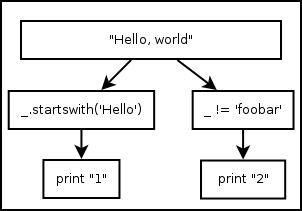
Both versions will print (each in its own thread, and not necessarily in that
order): 1 and 2.
5.2. Using Iterable Object as for Statement
There’s no for keyword, instead, every Iterable object is treated as a
for-loop. For example:
[1,2,3] -> print
And
(1,2,3) -> print
Both, Graphically (Visual programming wise) represented as:
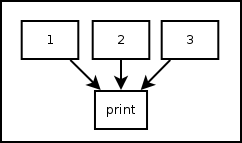
Will print 1, 2, and 3 (not necessarily in that
order). The same applies to generator functions (i.e. yield) and Python
classes that implement __iter__() method.
The only exception are strings. Pythonect does not iterate Python strings by default. To iterate a string in Pythonect, use Python’s built-in iter() function as follows:
iter("abc") -> print
The code above will print the letters: a, b, and c (not
necessarily in that order).
5.3. Using Dictionary as switch Statement
There’s no switch keyword in Pythonect, instead, every literal dict
can be used as a switch-like mechanism (without fallthrough). For example:
1 -> {1: 'One', 2: 'Two'} -> print
Will print One. While:
3 -> {1: 'One', 2: 'Two'} -> print
Will will not print and return False